Import projects
You can bring existing tasks into a kora project. Import is available in every plan, Free included. You find it in the project under Settings → Import / Export, in the Import tasks section.
At the top you choose the source: CSV, Asana, Trello, GitHub or Jira. Below it you see how to create the export in that source. Paste the export text into the Paste export field and click Import.
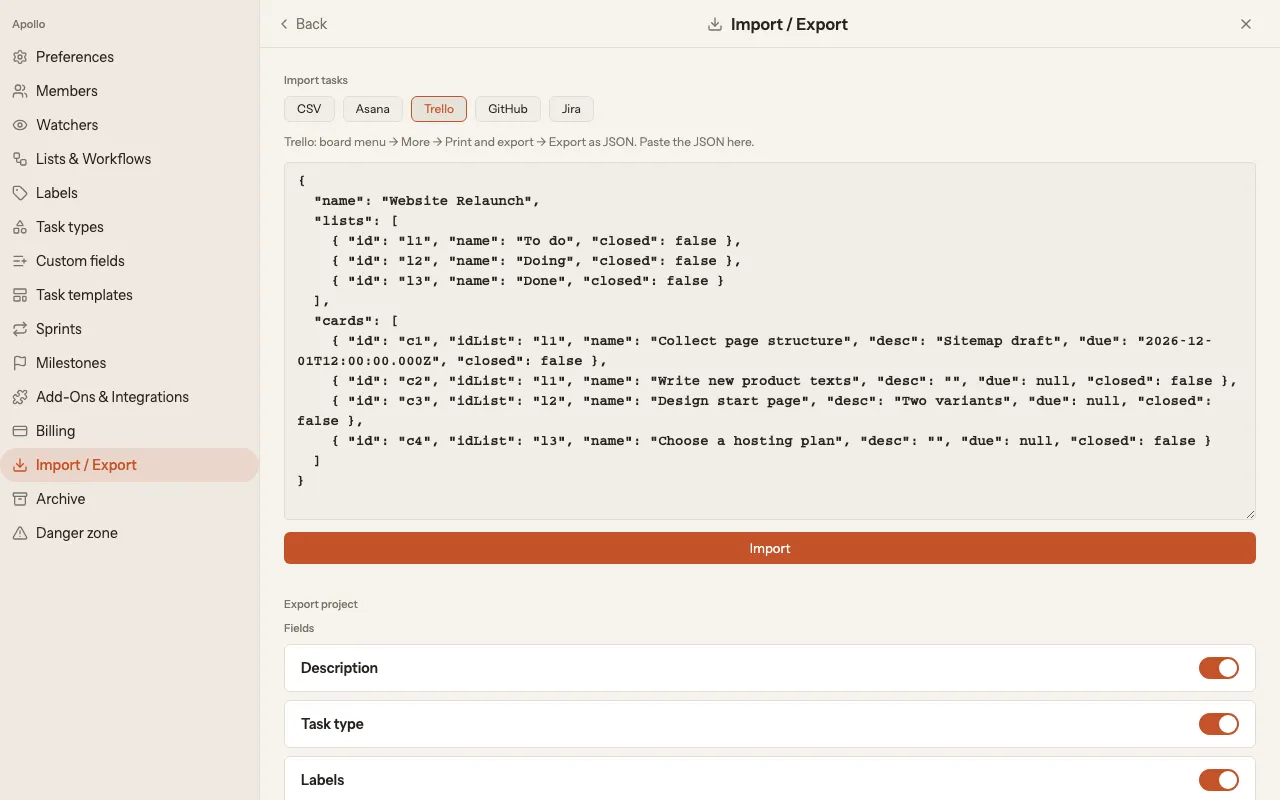
Trello
Section titled “Trello”- In Trello: board menu → More → Print and export → Export as JSON.
- In kora, choose Trello and paste the JSON.
- Click Import.
- In Asana: project → ⋮ → Export → JSON.
- In kora, choose Asana and paste the JSON.
- Click Import.
- In Jira: export issues as CSV (columns Summary, Status, Description, Due Date).
- In kora, choose Jira and paste the CSV.
- Click Import.
GitHub
Section titled “GitHub”You get GitHub issues as JSON through the gh command line, for example with gh issue list --json title,body,state. In kora, choose GitHub, paste the JSON and click Import.
Choose CSV and paste the CSV content. These columns are recognised: title (required), description, story_points, due_date and visible_to. Tasks are added to the first list of the project. List, state, type and labels from the CSV file are not carried over.
After the import
Section titled “After the import”kora shows how many tasks were imported and how many lists were created for them. If something went wrong, the errors are listed below. Check the result on the board.