Create an invoice
kora builds the invoice from the time tracked in the project. You only pick the client and the period.
Before you start
Section titled “Before you start”- You are an Owner or Admin of the organization. Project admins see their project’s invoices but do not create them, since the organization manages the clients.
- There is a client: Add a client.
- The project or the person has an hourly rate: Set an hourly rate.
- There is time in the period that is marked Billable: Track time.
Create the invoice
Section titled “Create the invoice”- In the project, open Settings (under More if there are many tabs), then Billing.
- Under New invoice, pick the Client.
- Pick the period under From and To.
- If needed, enter the VAT (%).
- Click Generate invoice.
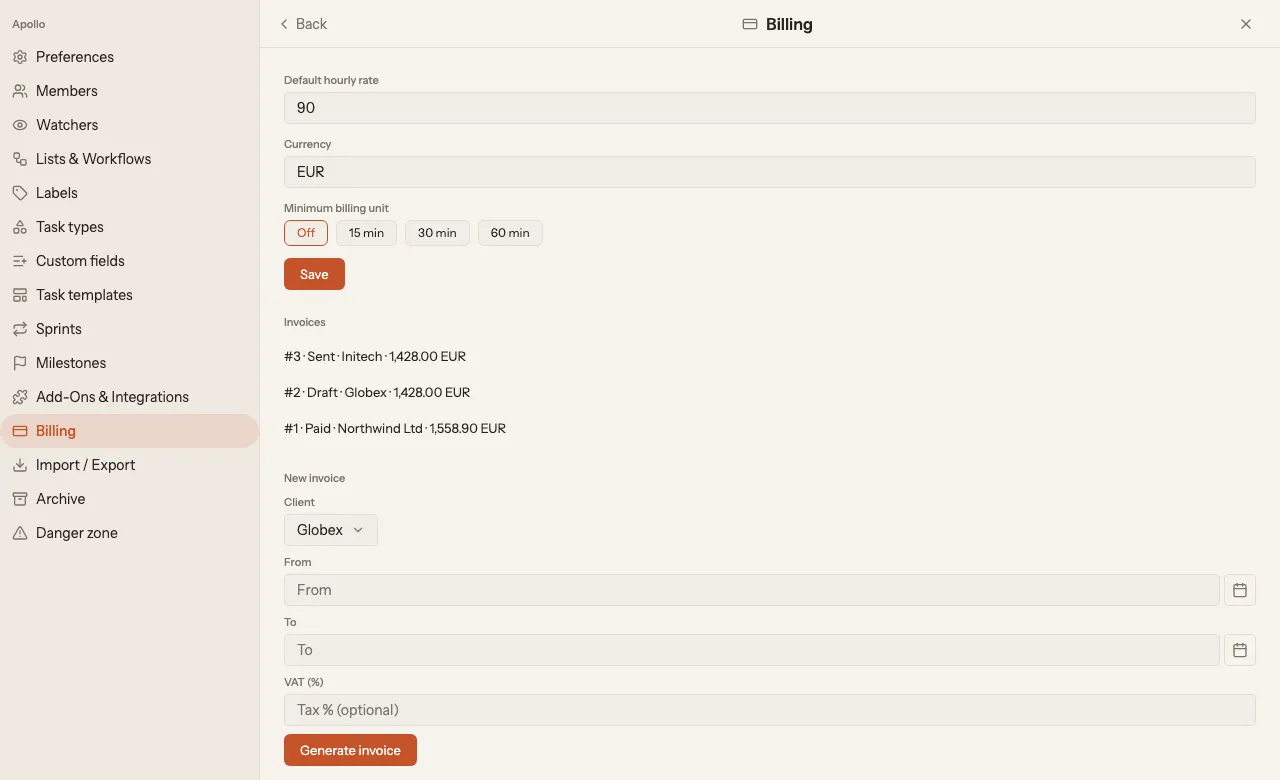
The invoice gets the billable time from the period that is not on an invoice yet. Running timers do not count. If a rate is missing or there is no matching time, kora does not create the invoice and tells you why.
After you create it
Section titled “After you create it”The new invoice is listed at the top under Invoices as a Draft. Click it to open it. There you see it as a document, can download it as a Draft PDF, issue it with Issue and create PDF and later Mark as paid. You can remove a draft with Delete draft.
When you issue it, kora freezes the invoice and creates the invoice PDF, as an e-invoice for business clients in euro. What that needs and how to correct a frozen invoice is covered in E-invoices.